
SEOHA PRODUCT MANAGER

Product installation.
One place.

Install, update, and repair Graphics Deck, Search Deck, Caption Check, Range Cut, and the shared SEOHA Bridge in one place. Sign in with an email address that has an invitation or product access.

Mac 1.0.6 · Windows 1.0.6
Product Manager release history →

Product Manager and all registered products now use version 1.0.0 on Mac and Windows. Windows code signing and Mac signing and notarization are complete. Existing Manager users should install the latest installer once.

IN PRACTICE

Usage guides and recorded examples

Refer to the manual and release notes for current instructions and released versions. The recordings below show the interface at the time of capture, not verification of the latest UI.

View earlier-version recordings and screenshots

These preserved examples show real use of earlier versions. Buttons, settings and sign-in requirements may differ today. Select a screenshot to view it at its original size.

01 · Recorded workflow · 25 seconds

Earlier-version reference recording

Sign in to the app with email verification

Use the separate verification window and confirm sign-in in the app. Email addresses, codes, and the inbox are obscured.

Read the video walkthrough

In Product Manager's SEOHA account area, choose Sign in by email. Enter the approved email in the separate verification window and complete the required consent and security check. Enter the emailed code in that window, return to the app, and confirm sign-in. Actual email addresses and codes are obscured, and the inbox is replaced with a black screen. Sign-in and product access are separate.
02 · Recorded workflow · 27 seconds

Earlier-version reference recording

Install products and open them in Premiere

From Product Manager installation checks to launching Premiere extensions and resident-menu apps.

Read the video walkthrough

Install the required products and shared SEOHA Bridge in Product Manager. Review and follow the installation instructions, then open Premiere. Open SEOHA Bridge and Caption Check from the Extensions menu, and launch Graphics Deck or Search Deck from the resident icon. Account information and the desktop were excluded from the public recording. Premiere must be fully quit and reopened after installation.

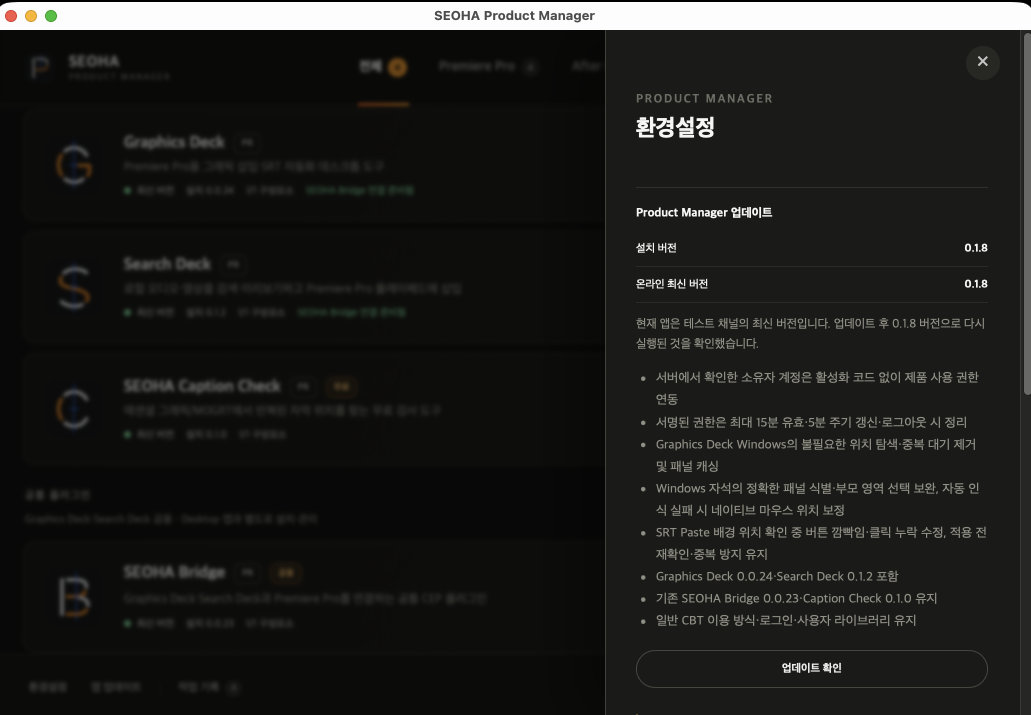
Check app updates

Recorded version 0.1.8 · earlier interface

Check app updates

Compare installed and online versions. The screenshot shows version 0.1.8; see release notes for the latest changes.

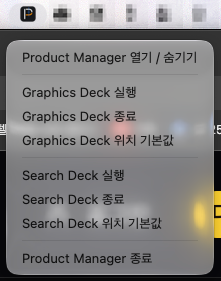
Launch and quit from the resident menu

Earlier-version reference screenshot

Launch and quit from the resident menu

Launch or quit the two apps and reset their positions from the Mac menu bar. Windows uses the notification area.

MANAGE, VERIFY, RECOVER

Successful installation and
successful operation are assessed separately.

Check installation status for each product and the shared SEOHA Bridge, then install or repair only the components needed. After installation, check the connection and results in Premiere.

SEOHA Product Manager
Example configuration

Product updates

Check installation status and new versions in one place.

Range Cut

Premiere Pro · CEP

Mac 1.0.0 · Windows 1.0.0

Graphics Deck

Premiere Pro · Desktop

Mac 1.0.3 · Windows 1.0.3

Search Deck

Premiere Pro · Desktop

Mac 1.0.3 · Windows 1.0.3

SEOHA Caption Check

Premiere Pro · Free panel

Mac 1.0.0 · Windows 1.0.0

SEOHA Bridge

Shared plugin · Separate installation

Mac 1.0.0 · Windows 1.0.0

Installation status

Check components by product

Install / reinstall

Apply only verified installers

Recovery workflow

Back up the previous state and restore on failure

Integrity checks

Verify installer hashes and contents

ACCOUNT ACCESS

Sign in by email.
Manage products.

Sign in with email verification, without a separate password. Credentials are stored in the operating system's secure storage. Sign in again after signing out or when the session expires.

Email verification

Sign in with an email that has access

Stay signed in

Use the operating system's secure storage

Access check

Check access linked to the account

CURRENT STATUS

Available and planned features
Clearly distinguished.

Commercial payments and purchase access sync — planned for the official service
Device activation and licence management — planned for the official service
Official free trials and device limits — planned for the official service

Account sign-in, product installation, updates, repair and app self-updates are available. Mac releases use Developer ID signing and Apple notarization. Windows apps and installers are code-signed and timestamped under SEOHA. Current access is separate from purchasing a license and activating devices.

Product Manager User guides

Installation steps, practical instructions, and troubleshooting.