PREMIERE PRO TOOL

Mac 1.0.3 · Windows 1.0.3

Graphics
Deck

Choose a MOGRT, adjust its options, and insert it at SRT times—all in one interface.

Launch week 1 US$49 · Regular US$ 69 · VAT included

One-time purchase · 12 months of updates included

One purchaser · Up to 2 computers · 12 months of technical support. You can continue using versions provided during the update period after it ends.

Base prices by launch week

Price for 1 licence · All prices in US dollars (USD) · VAT included

By launch week · 1 licence · Purchase total · USD · VAT included
Launch week Graphics Deck
Week 1US$49
Week 2US$54
Week 3US$59
Week 4US$64
Week 5 onward · RegularUS$69
View weekly totals for 5 and 10 licences

5 licences · Purchase total 10% additional discount

By launch week · 5 licences · Purchase total · USD · VAT included
Launch week Graphics Deck
Week 1US$220.50
Week 2US$243
Week 3US$265.50
Week 4US$288
Week 5 onward · RegularUS$310.50

10 licences · Purchase total 20% additional discount

By launch week · 10 licences · Purchase total · USD · VAT included
Launch week Graphics Deck
Week 1US$392
Week 2US$432
Week 3US$472
Week 4US$512
Week 5 onward · RegularUS$552

Week 1 is the seven-day period starting when the site's first sale is completed. All products and bundles share this start. Each following week lasts seven days, and regular prices apply from week 5.

UI recreation · Example user configuration · Designs not included · Names only
28 designs
Selected graphic optionsCtrl key trigger · Graphics selected in Premiere
Gradient Color100%
Stroke Color100%

IN PRACTICE

Usage guides and recorded examples

Refer to the manual and release notes for current instructions and released versions. The recordings below show the interface at the time of capture, not verification of the latest UI.

01 · Recorded workflow · 124 seconds

Existing public demonstration · recorded version not documented

Graphics Deck: real workflow demonstration

A user-supplied silent recording of design selection, caption insertion, selected properties and preferences.

Read the video walkthrough

This user-supplied recording shows Graphics Deck in use: choosing a design, inserting graphics into a Premiere timeline, and checking text, selected properties, insertion options and preferences. Audio is omitted. The MOGRT designs and media shown are user examples, not included with the base software purchase. Some screens may differ in versions updated after recording.

View earlier-version recordings and screenshots

These preserved examples show real use of earlier versions. Buttons, settings and sign-in requirements may differ today. Select a screenshot to view it at its original size.

01 · Recorded workflow · 29 seconds

Earlier-version reference recording

From choosing a design to inserting captions

A recorded workflow changing text in Graphics Deck and inserting a graphic into the Premiere timeline.

Read the video walkthrough

Select a design from the library. Adjust its text and insertion options in the editor, then choose Insert caption. Check the text in Premiere's Program Monitor and the graphic created on the timeline. The recording shows an earlier version of the interface; some labels may differ by installed version.

Name-based library

Earlier-version reference screenshot

Name-based library

Design categories and SRT tools in a single-row deck. The designs shown are an example user library.

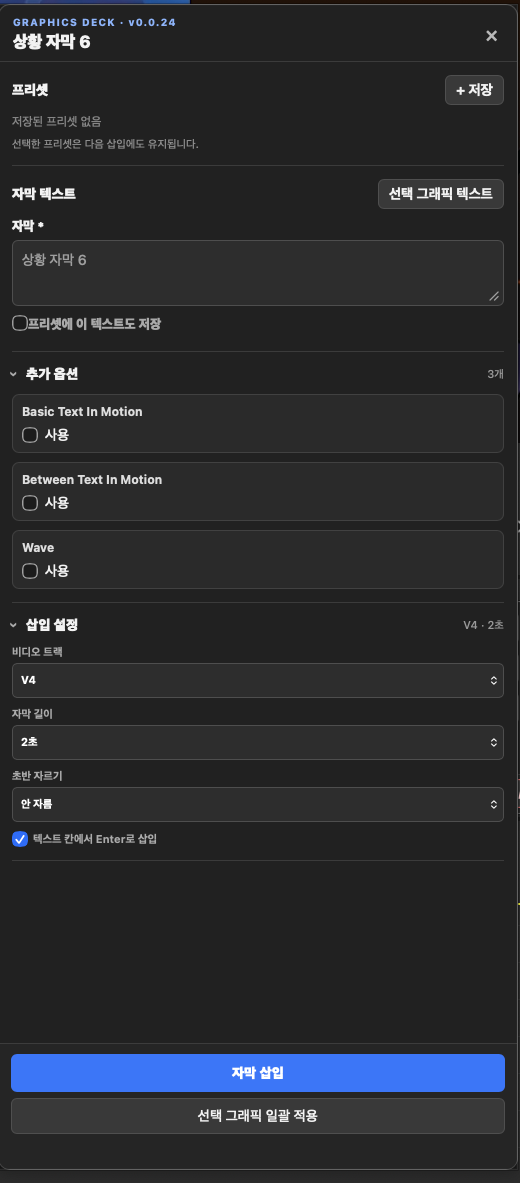
Text, options, and insertion settings

Earlier-version reference screenshot

Text, options, and insertion settings

Edit text and options exposed by the MOGRT, then select the target track and caption duration.

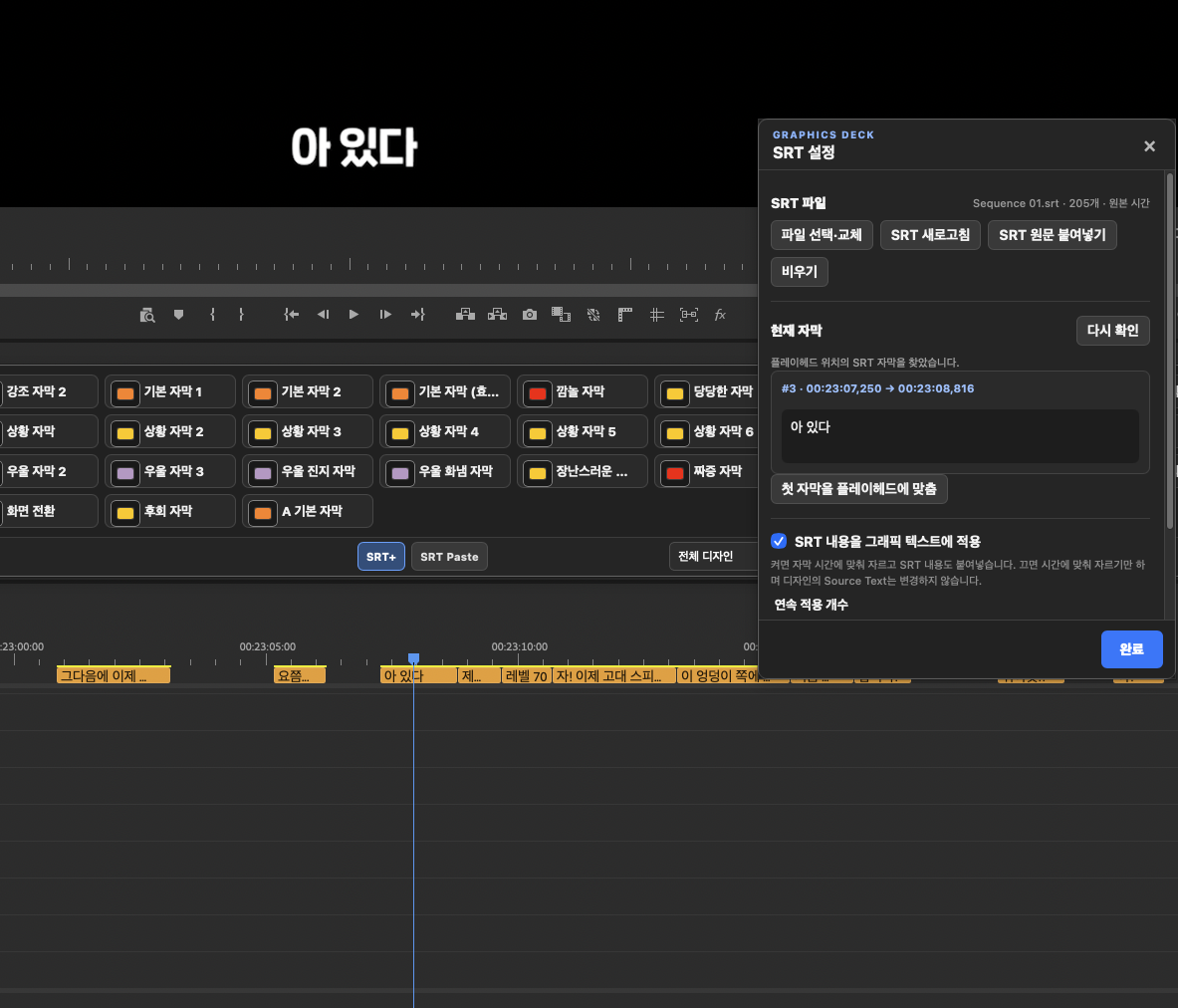
SRT settings and current caption

Earlier-version reference screenshot

SRT settings and current caption

Review the current cue, text application, and consecutive count. The recording illustrates a workflow; it is not evidence of frame-accuracy verification.

Thumbnail library

Earlier-version reference screenshot

Thumbnail library

Switch between name and thumbnail views to find designs. This is an example user configuration and may differ from the library edition's 43 basic MOGRTs. The empty-library edition contains no templates.

01

Personal MOGRT library

Add existing MOGRTs to a dedicated library and organise them into categories.

02

SRT-timed insertion

Insert the selected design using SRT text and start/end times.

03

Edit exposed properties

Adjust text, checkboxes, numbers, and colours exposed by each MOGRT in Premiere Pro.

04

SRT Paste

Reduce repetitive work by applying SRT text in order to graphics already placed on the timeline.

05

Repeated insertion

Apply a selected graphic design across multiple SRT segments.

06

Name or thumbnail view

Browse library items in a name-based or thumbnail deck.

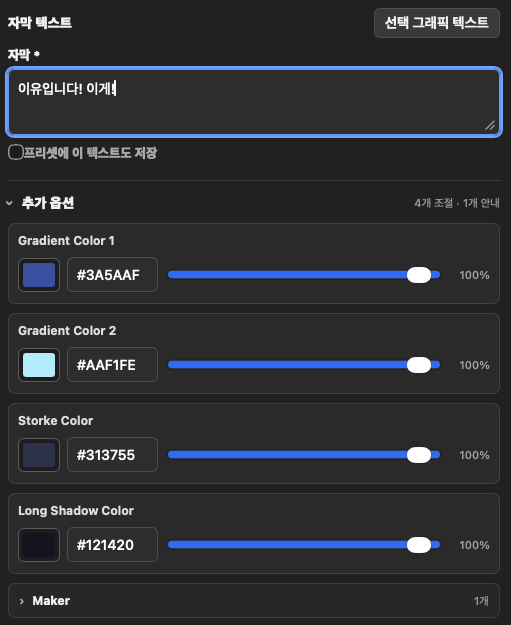
Example of editing text and colour properties exposed by a user's MOGRT
Properties vary by MOGRT. The colour and text controls shown are examples from a particular user design.

WORK WITH YOUR OWN DESIGNS

Keep the design.
Bring controls closer.

Graphics Deck organises existing MOGRTs and makes their exposed properties quicker to use in Premiere Pro. Add personal assets to the standard empty-library edition. Accounts granted Graphics Deck access can also install the library edition with 43 basic MOGRTs.

  • Original user MOGRT files are not deleted
  • No templates in the standard edition · Access-controlled library edition includes 43 basic MOGRTs
  • Editable properties depend on how the MOGRT was created
  • After Effects creates MOGRTs; the panel runs in Premiere Pro

COMPATIBILITY

Use with Premiere Pro

Premiere Pro 2023–2026macOSWindows

Graphics Deck User guides

Installation steps, practical instructions, and troubleshooting.